RIC elements


VarMap


VarMap elements can be used for defining transfer functions for parameter values.


Parameter

Function

Range

Parameter

VarMap

VarMap ID

ID ov VarMap

1 - 10


Domain

Domain values for linear interpolation

0 - 255


Range

Range values for linear interpolation

0 - 65535


Size of element:

16+ Byte (Size of element is dependent from count of pairs of domain/range values)


Usage:

VarMap is one of the most complex RIC elements which can be used for RIC files. VarMap elements will be used for transferring a given parameter to a new value. Inside the VarMap element you can define up to 256 interpolation points (minimum count of points is 2). Within other RIC elements you can define attributes for using the VarMap for transferring a given value of parameter to a new value which will be used for displaying the RIC element.


Values of domain points (X axis) have a range from 0 to 255 and valid values for the range value (Y axis) can be from 0 to 65535.


You can define the interpolation points on three different methods:


Direct input with mouse

Every mouse click into the working area will define a new interpolation point. If the domain value was already given, than the range value will be updated.

If you point to an already given interpolation point than it will be marked with a little circle around it. If you press the right mouse button on a already defined interpolation point than it will be removed.

Using input fields

With the input fields you can do a fine adjustment of the interpolation points. Please keep in mind that the domain value can only be modified that it will be bigger than the precursor domain value and smaller than the successor domain value. The range values itself can be modified independent.

Pasting from cliipboard


If you use the function import from clipboard than it will get pairs of domain and range values. Already defined interpolation points will be removed first. The new points will be sorted ascending by domain value.

There are some restrictions for importing from clipboard: A minimum of  4 values (2 pairs) must be placed inside the clipboard – and there must be a even number of values in it. If this isn’t the case, an error message will be displayed.


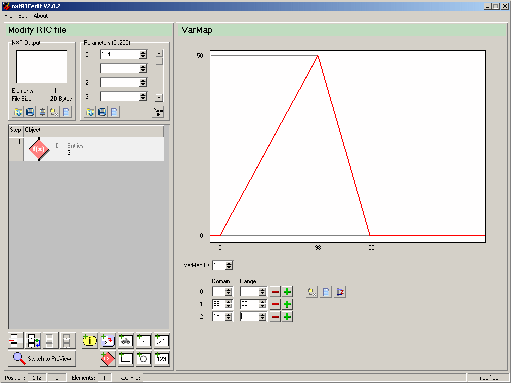
Following picture shows how you can define the interpolation points for a VarMap element:


Hier wurden mit Hilfe der Maus drei Stützpunkte (Domain-Range-Paare) definiert:

 
  No of interpolation point Domain value Range value  
  0 0 0  
  1 100 50  
  2 150 0  


The transfer function of a VarMap element return the range value (y axis) of a point on the red chart which is above the given domain value (x axis).


The following example will show on which way the VarMap function will return the value 35 from a given value 70 of parameter 0:


Use VarMap 1 and

Parameter[ 0 ] = 70


VarMap 1:

    0: 0 / 0

    1: 100 / 50

    2: 150 / 0


Value 70 is between the defined domain values D[0]=0 and D[1]=100 on the X axis.

So it must be calculated by an linear interpolation between both interpolation points. As result you will get the range value of 35 above the domain value of 70.


Values left from the first defined domain value will get the range value of the first interpolation point.

Values behind the last defined domain value will get the range value of the last interpolation point.


Good examples for using of VarMap elements you can find in the example section: New fonts and Voltmeter.

   
Hint:

Behind the input fields for domain and range values you can find up to two buttons:


Button Function

Delete the interpolation point which is defined in the line. This deletion button is only available when there are still more than 2 interpolation points.

Add a new interpolation point after the current line. This button is only available when there is enough space available for inserting a point after the current one.


There are also two other buttons for manipulating the list of interpolation points::


Button

Function

This button deletes all interpolation points and replace them by pairs of domain and range values from the clipboard. This is a easy way for take over the values from other programs like Microsoft Excel. But there are some rules which must be followed: There must be a even count of values in the clipboard and minimum count of values is 4 (for 2 interpolation points).

Delete all interpolation points and add the default interpolation points [0,0] and [93,63]

With this button you can optimize the size of the VarMap element by deleting of all needless interpolation points.